
TUNEPOWER POUR IPOD #F8Z088EA - IPod audio accessories BELKIN - Free user manual and instructions
Find the device manual for free TUNEPOWER POUR IPOD #F8Z088EA BELKIN in PDF.


| Product Type | External battery for iPod video |
| Brand | BELKIN |
| Model | TunePower F8Z088EA |
| Compatibility | iPod video 30GB and 60GB |
| Power | Built-in rechargeable lithium-ion battery |
| Audio battery life | Up to 10 hours |
| Video battery life | Up to 6 hours |
| Charging time (TunePower only) | Approximately 2 hours |
| Full charging time (with iPod) | Approximately 4 hours |
| Charge indicator | Green (full), Amber (partial), Red (<20 min) |
| Number of battery cycles | 400 to 500 cycles |
| Recommended charging temperature | 0°C to 30°C |
| Recommended discharging temperature | 0°C to 50°C |
| Storage temperature | -20°C to 40°C |
| Maintenance | Discharge before prolonged storage; recharge 10-15 minutes every 6 months |
| Safety | Do not expose to extreme temperatures; use only the supplied cable |
| Warranty | 3 years |
| Package contents | TunePower, charging cable, two sleeves (30GB and 60GB) |
| Country of manufacture | China |
Frequently Asked Questions - TUNEPOWER POUR IPOD #F8Z088EA BELKIN
User questions about TUNEPOWER POUR IPOD #F8Z088EA BELKIN
0 question about this device. Answer the ones you know or ask your own.
Ask a new question about this device
Download the instructions for your IPod audio accessories in PDF format for free! Find your manual TUNEPOWER POUR IPOD #F8Z088EA - BELKIN and take your electronic device back in hand. On this page are published all the documents necessary for the use of your device. TUNEPOWER POUR IPOD #F8Z088EA by BELKIN.
USER MANUAL TUNEPOWER POUR IPOD #F8Z088EA BELKIN
Congratulations and thank you for purchasing the TunePower for iPod video from Belkin. Now you can power your iPod video even when the internal battery is drained, and keep the music playing anytime, anywhere. Please be sure to read all the instructions in this User Manual so that you can get the most from your Belkin product.
Introduction | 01
Setup Instructions
There are two sleeve sizes included: one for the iPod video 30GB and one for the iPod video 60GB. Select the appropriate size for your iPod video.
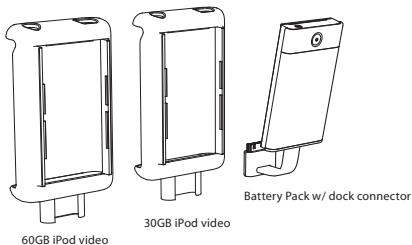
EN
Setup Instructions | 02
Setup Instructions
- Attach the TunePower's dock connector to the slot on the bottom of the iPod video's sleeve.
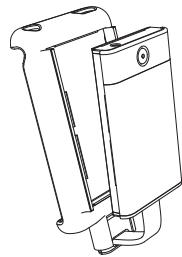
natural_image
Technical line drawing of a mechanical device with no visible text or symbols- Securely attach the battery to the iPod video's sleeve. Make sure the tabs on the top and bottom of the battery pack securely latch into the sleeve.
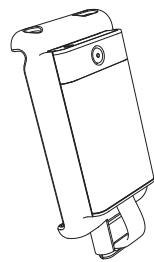
natural_image
Line drawing of a mechanical device with a cylindrical housing and mounting bracket (no text or symbols)Setup Instructions | 03
Setup Instructions
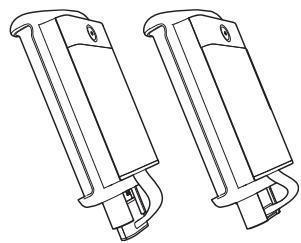
- Attach the form-fitted sleeve to the iPod video by sliding the iPod video in bottom to top.
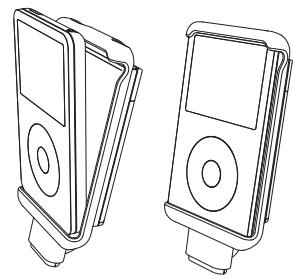
natural_image
Line drawings of two electronic devices with front and back views (no text or symbols)- Connect the TunePower to the iPod video by plugging the TunePower's dock connector into the bottom of the iPod video.
natural_image
Technical line drawing of two mechanical components with no visible text or symbolsSetup Instructions | 04
Operating the Belkin TunePower
Once the Belkin TunePower is connected to the iPod video, the iPod video will run off the battery pack instead of the internal iPod video's battery (as long as there is enough power in the battery pack).
The TunePower will provide up to 10 hours of additional music playtime ^* ; six hours of additional video playtime.
natural_image
Diagram showing two views of a device with a hand interacting with the screen (no text or symbols present)*Performance may vary based on Apple® iPod video firmware version in use.
Operating the Belkin TunePower | 05
Operating the Belkin TunePower
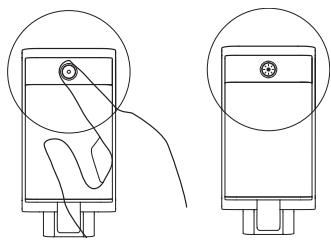
To check the remaining battery power level, press the button on the top end of the TunePower and let go. The button will light up to indicate the battery status:
natural_image
Simple line drawing of a mechanical component with a circular outline and internal features (no text or symbols)| Green | The battery is fully charged. |
| Amber | The battery is partially charged. The transition from green to red is gradual indicating the charge status of the battery. |
| Red | Less than 20 minutes remain. |
EN
Operating the Belkin TunePower | 06
Charging the Belkin TunePower
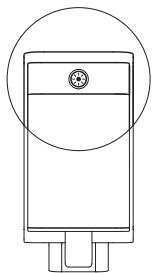
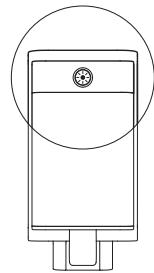
For additional power and charging, connect the DC plug end of the included AC wall charger into the DC jack on the top of the TunePower. Connect the AC wall charger into any US wall outlet.
The LED charge indicator will illuminate when the Belkin TunePower is charging. This indicator will turn off when the battery has been charged to approximately 90%. To maximize charge, leave the battery pack connected for 10 minutes after the indicator turns off. Disconnecting the Belkin TunePower before this time, or leaving it connected for longer periods, will not damage the TunePower.
While the iPod video is connected to the TunePower, both the iPod video and the TunePower can be charged simultaneously. After the TunePower is completely charged, the charging cycle will continue to charge the iPod video.
natural_image
Simple line drawing of a rectangular device with a circular top and base, no text or symbols present.Charging the Belkin TunePower | 07
Charging the Belkin TunePower
Approximate charging times are as follows:
TunePower (whether connected to iPod video or not): 2 hours Full-charge time: 4 hours
If the LED charge indicator flashes at any time during charging, a FAULT has occurred. Simply disconnect the Belkin TunePower from the supplied cable for approximately 30 seconds, and reconnect the cable. Charging should begin automatically.
Notes:
The Belkin TunePower will supply power to the iPod video whenever it is connected. When not in use, it is helpful to disconnect the Belkin TunePower from the iPod video (recommended), or make sure that the iPod video is in the OFF and LOCKED position to conserve power.
The iPod video can be charged at the same time as the Belkin TunePower. Doing so should not increase the length of time that it takes to charge the iPod video.
The Belkin TunePower charging cable must limit its power consumption at times. In some instances, the iPod video will have a higher charge current. At those times, the charger will limit the amount of current going into the TunePower batteries, while delivering full charge power to the iPod video. This increases the total charge time of the TunePower to up to five hours.
EN
Charging the Belkin TunePower
Helpful Hints
As with all rechargeable lithium-ion batteries, the TunePower will slowly discharge over time, even when not connected to the iPod video. High temperatures will increase the rate that the Belkin TunePower will self-discharge.
When storing the Belkin TunePower for more than one month, Belkin recommends:
- The TunePower should be discharged—the LED indicator should be red. If stored in any other state (including no LED), the Belkin TunePower may lose some of its capacity, which may or may not be recoverable in the future. The Belkin TunePower should NEVER be stored for long periods of time when fully charged.
- Store the TunePower in a cool dry location. The best temperature range for storage is -20–40 degrees Celsius.
- It is recommended that the TunePower be charged for 10–15 minutes every six months (being stored) to decrease the risk of lost capacity.
The Belkin Battery Pack has a life cycle of 400–500 cycles. Temperature can reduce the life cycle of this product. Belkin recommends 0–30 degrees Celsius for charging and 0–50 degrees Celsius for discharge (storage above 40 degrees Celsius can reduce life cycle). The Belkin TunePower does not have to be completely discharged (LED red or off) before charging. The Belkin TunePower can be charged at any charge level. This will not reduce the life cycle of the TunePower.
Helpful Hints | 09
Information
DECLARATION OF CONFORMITY WITH FCC RULES FOR ELECTROMAGNETIC COMPATIBILITY
We, Belkin Corporation, of 501 West Walnut Street, Compton, CA 90220, declare under our sole responsibility that the product:
F8Z088ea
to which this declaration relates:
This equipment has been tested and found to comply with the limits for a Class B digital device, pursuant to part 15 of the FCC Rules. These limits are designed to provide reasonable protection against harmful interference in a residential installation. This equipment generates, uses, and can radiate radio frequency energy and, if not installed and used in accordance with the instructions, may cause harmful interference to radio communications. However, there is no guarantee that interference will not occur in a particular installation. If this equipment does cause harmful interference to radio or television reception, which can be determined by turning the equipment off and on, the user is encouraged to try to correct the interference by one or more of the following measures:
. Reorient or relocate the receiving antenna.
. Increase the separation between the equipment and receiver.
. Connect the equipment into an outlet on a circuit different from that to which the receiver is connected.
Consult the dealer or an experienced radio/TV technician for help.
ICES
Belkin Corporation Limited 3-Year Product Warranty
What this warranty covers.
Belkin Corporation warrants to the original purchaser of this Belkin product that the product shall be free of defects in design, assembly, material, or workmanship.
What the period of coverage is.
Belkin Corporation warrants the Belkin product for three years.
What will we do to correct problems?
Product Warranty.
Belkin will repair or replace, at its option, any defective product free of charge (except for shipping charges for the product).
What is not covered by this warranty?
All above warranties are null and void if the Belkin product is not provided to Belkin Corporation for inspection upon Belkin's request at the sole expense of the purchaser, or if Belkin Corporation determines that the Belkin product has been improperly installed, altered in any way, or tampered with. The Belkin Product Warranty does not protect against acts of God (other than lightning) such as flood, earthquake, war, vandalism, theft, normal-use wear and tear, erosion, depletion, obsolescence, abuse, damage due to low voltage disturbances (i.e. brownouts or sags), non-authorized program, or system equipment modification or alteration.
How to get service.
To get service for your Belkin product you must take the following steps:
- Contact Belkin Customer Service (see details on page 13), within 15 days of the Occurrence. Be prepared to provide the following information:
a. The part number of the Belkin product.
b. Where you purchased the product.
c. When you purchased the product.
d. Copy of original receipt.
- Your Belkin Customer Service Representative will then instruct you on how to forward your receipt and Belkin product and how to proceed with your claim.
Warranty | 11
Belkin Corporation Limited 3-Year Product Warranty
Belkin Corporation reserves the right to review the damaged Belkin product. All costs of shipping the Belkin product to Belkin Corporation for inspection shall be borne solely by the purchaser. If Belkin determines, in its sole discretion, that it is impractical to ship the damaged equipment to Belkin Corporation, Belkin may designate, in its sole discretion, an equipment repair facility to inspect and estimate the cost to repair such equipment. The cost, if any, of shipping the equipment to and from such repair facility and of such estimate shall be borne solely by the purchaser. Damaged equipment must remain available for inspection until the claim is finalized. Whenever claims are settled, Belkin Corporation reserves the right to be subrogated under any existing insurance policies the purchaser may have.
How state law relates to the warranty.
THIS WARRANTY CONTAINS THE SOLE WARRANTY OF BELKIN CORPORATION, THERE ARE NO OTHER WARRANTIES, EXPRESSED OR, EXCEPT AS REQUIRED BY LAW, IMPLIED, INCLUDING THE IMPLIED WARRANTY OR CONDITION OF QUALITY, MERCHANTABILITY OR FITNESS FOR A PARTICULAR PURPOSE, AND SUCH IMPLIED WARRANTIES, IF ANY, ARE LIMITED IN DURATION TO THE TERM OF THIS WARRANTY.
Some states do not allow limitations on how long an implied warranty lasts, so the above limitations may not apply to you.
IN NO EVENT SHALL BELKIN CORPORATION BE LIABLE FOR INCIDENTAL, SPECIAL, DIRECT, INDIRECT, CONSEQUENTIAL OR MULTIPLE DAMAGES SUCH AS, BUT NOT LIMITED TO, LOST BUSINESS OR PROFITS ARISING OUT OF THE SALE OR USE OF ANY BELKIN PRODUCT, EVEN IF ADVISED OF THE POSSIBILITY OF SUCH DAMAGES.
This warranty gives you specific legal rights, and you may also have other rights, which may vary from state to state. Some states do not allow the exclusion or limitation of incidental, consequential, or other damages, so the above limitations may not apply to you.
Warranty | 12
Free Tech Support
You can find additional support information on our website www.belkin.com through the tech-support area. If you want to contact technical support by phone, please call the number you need from the list below*.
*National call rates may apply
| Country | Number | Internet adress |
| AUSTRIA | 08 - 20 20 07 66 | http://www.belkin.com/uk/networking/ |
| CZECH REPUBLIC | 23 900 04 06 | http://www.belkin.com/uk/networking/ |
| DENMARK | 701 22 403 | http://www.belkin.com/uk/networking/ |
| FINLAND | 00800 - 22 35 54 60 | http://www.belkin.com/uk/networking/ |
| FRANCE | 08 - 25 54 00 26 | http://www.belkin.com/fr/networking/ |
| GERMANY | 0180 - 500 57 09 | http://www.belkin.com/de/networking/ |
| GREECE | 00800 - 44 14 23 90 | http://www.belkin.com/uk/networking/ |
| HUNGARY | 06 - 17 77 49 06 | http://www.belkin.com/uk/networking/ |
| ICELAND | 800 8534 | http://www.belkin.com/uk/networking/ |
| IRELAND | 0818 55 50 06 | http://www.belkin.com/uk/networking/ |
| ITALY | 02 - 69 43 02 51 | http://www.belkin.com/it/support/tech/issues_more.asp |
| LUXEMBOURG | 34 20 80 8560 | http://www.belkin.com/uk/networking/ |
| NETHERLANDS | 0900 - 040 07 90 | http://www.belkin.com/nl/networking/ |
| NORWAY | 815 00 287 | http://www.belkin.com/uk/networking/ |
| POLAND | 00800 - 441 17 37 | http://www.belkin.com/uk/networking/ |
| PORTUGAL | 707 200 676 | http://www.belkin.com/uk/networking/ |
| RUSSIA | 495 580 9541 | http://www.belkin.com/networking/ |
| SOUTH AFRICA | 0800 - 99 15 21 | http://www.belkin.com/uk/networking/ |
| SPAIN | 90 - 202 43 66 | http://www.belkin.com/es/support/tech/networkingsupport.asp |
| SWEDEN | 07 - 71 40 04 53 | http://www.belkin.com/se/support/tech/networkingsupport.asp |
| SWITZERLAND | 08 - 48 00 02 19 | http://www.belkin.com/uk/networking/ |
| UK | 0845 - 607 77 87 | http://www.belkin.com/uk/networking/ |
Free Tech Support | 13
Introduction
natural_image
Technical line drawing of a mechanical device with no visible text or symbolsnatural_image
Line drawing of a mechanical device with a cylindrical housing and mounting bracket (no text or symbols)Mode d'emploi | 17
natural_image
Line drawings of two electronic devices with front and back views (no text or symbols)natural_image
Technical line drawing of two mechanical components with no visible text or symbolsm = 311
natural_image
Technical line drawing of a device with two views: top shows a hand holding a circular component, bottom shows a close-up of a button (no text or symbols)natural_image
Simple line drawing of a mechanical component with a circular outline and internal features (no text or symbols)natural_image
Simple line drawing of a rectangular device with a circular top and base, no text or symbols present.Recharge du TunePower de Belkin | 21
m = 311
natural_image
Technical line drawing of a mechanical component with no visible text or symbolsnatural_image
Line drawing of a mobile phone device with a rectangular body and attached port (no text or symbols)natural_image
Line drawing of two electronic devices with front and back views (no text or symbols)natural_image
Technical line drawing of two mechanical components with no visible text or symbolsnatural_image
Technical line drawing of a device with two views: top shows a hand holding a circular component, bottom shows a close-up of a button (no text or symbols)natural_image
Simple line drawing of a rectangular device with a circular top and base, no text or symbols present.natural_image
Simple line drawing of a rectangular device with a circular top and base, no text or symbols present.natural_image
Technical line drawing of a mechanical device with no visible text or symbolsnatural_image
Line drawing of a mechanical device with a cylindrical housing and mounting bracket (no text or symbols)natural_image
Line drawings of two electronic devices with front and back views (no text or symbols)natural_image
Technical line drawing of two mechanical components with no visible text or symbolsnatural_image
Diagram showing two views of a device with a hand interacting with the screen (no text or symbols present)natural_image
Simple line drawing of a rectangular device with a circular top and base, no text or symbols present.natural_image
Simple line drawing of a rectangular device with a circular top and base, no text or symbols present.Carga del TunePower de Belkin | 49
Carga del TunePower de Belkin
natural_image
Technical line drawing of a mechanical component with no visible text or symbolsnatural_image
Line drawing of a mobile phone device with a rectangular body and attached port (no text or symbols)natural_image
Line drawing of two electronic devices with front and back views (no text or symbols)natural_image
Technical line drawing of two mechanical components with no visible text or symbolsnatural_image
Technical line drawing of a device with two views: top shows a hand holding a circular component, bottom shows a close-up of a button (no text or symbols)natural_image
Simple line drawing of a mechanical component with a circular outline and internal features (no text or symbols)natural_image
Simple line drawing of a rectangular device with a circular top and base, no text or symbols present.- Setup Instructions
- Operating the Belkin TunePower
- Charging the Belkin TunePower
- Approximate charging times are as follows:
- Notes:
- Helpful Hints
- Information
- F8Z088ea
- ICES
- Belkin Corporation Limited 3-Year Product Warranty
- What this warranty covers.
- What the period of coverage is.
- What will we do to correct problems?
- What is not covered by this warranty?
- How to get service.
- How state law relates to the warranty.
- Free Tech Support
- Introduction
- Carga del TunePower de Belkin
Brand : BELKIN
Model : TUNEPOWER POUR IPOD #F8Z088EA
Category : IPod audio accessories